Use Case
An application which needs secrets to be operated is installed on an EC2 Instance. Secrets stored in a configuration file should be handled in a way, that they could be checked in in a git repository and decrypted on the target machine. There they will be stored in the environment and used by the application.
In this lab, Mozilla SOPS is used to encrypt the secrets in a file. SOPS itself acts as an editor for such encrypted files and is able to deal with YAML, JSON, ENV, INI and BINARY (in this example .env) file formats. Furthermore, SOPS is able to deal with various Keys (AWS KMS, GCP KMS, Azure Key Vault, age, and PGP), in this case we'll use AWS KMS.
Strengths
There is no sophisticated handling of keys (e.g. GPG Keys) needed to deal with the secrets, the whole key handling happens in AWS. If users have the permission to access the KMS Key, they are able to read and write the secrets. We don't have to ship the secret to the EC2 Instance, as an assigned IAM Role allows the Instance to use the secret. As we'll see later, the usage of SOPS is pretty straightforward on the server-side. As SOPS supports lots of cloud providers and also GPG, it can be considered as cloud-agnostic (surely, the mechanisms to create keys and roles change).
Weakness
Nevertheless, the secret exist in clear-text on the server (as environment variables or files).
What we'll do in this lab
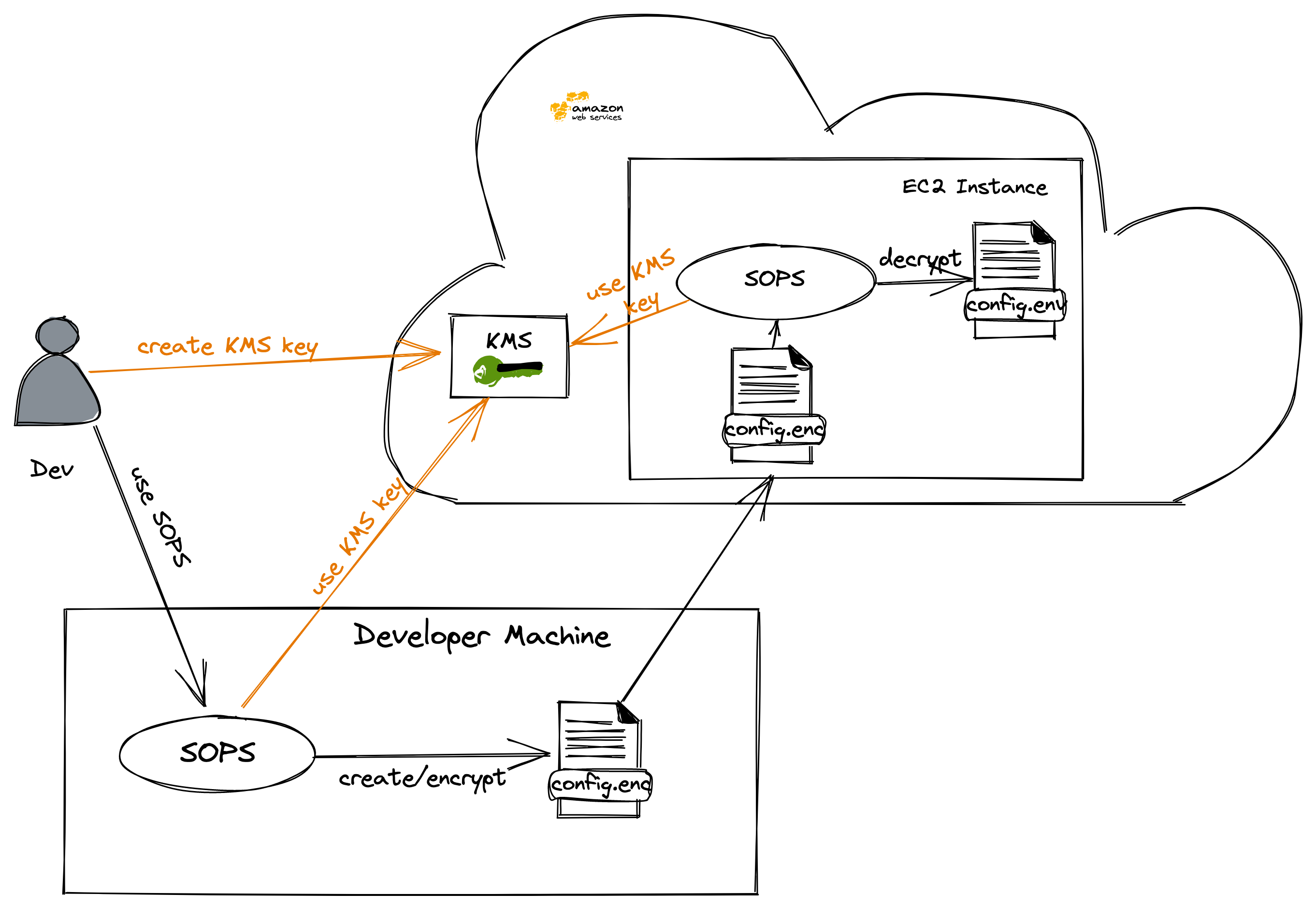
- This lesson will start with the creation of an AWS instance which will be used as a server
- Next, we will create an AWS KMS Key to be used with SOPS
- Afterward, we will install SOPS on our developer machine and the server
- Then, the created KMS Key will be used to encrypt variables in an env file with SOPS
- After that, the env file will be copied to the server and used as environment variables
- Finally, we will use the defined secrets in a web application
References:
- https://github.com/mozilla/sops
- https://aws.amazon.com/kms/
- https://medium.com/mercos-engineering/secrets-as-a-code-with-mozilla-sops-and-aws-kms-d069c45ae1b9
- https://daveops.xyz/en/2020/10/17/encrypting-helm-secrets-with-mozilla-sops-and-aws-ksm
- https://poweruser.blog/how-to-encrypt-secrets-in-config-files-1dbb794f7352
- Open the AWS Console
- Type Roles in the Search Bar and select "Roles (IAM Feature)"
- Click on "Create Role"
- AWS Service
- EC2
- Next: Permissions
- Next: Tags
- Next: Review
- Role Name: "LabRole" (if it doesn't exist)
- Create Role
As it will be easier to deal with SOPS from your machine, please install the AWS CLI on your machine. The Installation Instructions can be found here.
- In the AWS Academy
- Click on AWS Details
- Show AWS CLI Credentials and copy them
- Copy them to your machine ~/.aws/credentials
- After that, you should be able to communicate with your AWS environment, so try a simple command e.g.
aws ec2 describe-instances
Create a security group for SSH
aws ec2 create-security-group --group-name sops-lab-ssh-in --description "SSH Traffic for SOPS Lab Instances"
aws ec2 authorize-security-group-ingress \
    --group-name sops-lab-ssh-in \
    --protocol tcp \
    --cidr 0.0.0.0/0 \
    --port 22
Create an Instance
aws ec2 run-instances --image-id ami-087c17d1fe0178315 --instance-type t2.micro --tag-specifications "ResourceType=instance,Tags=[{Key=Name,Value=sops-instance}]" --key-name vockey --security-groups "sops-lab-ssh-in" --iam-instance-profile Name=LabInstanceProfile --output table
The EC2 instance has been created with an SSH Key which is available in the AWS Academy environment. You can fetch the keys the same way you got your AWS CLI Configuration (AWS Academy -> AWS Details -> SSH Key).
For the further progress of this lab, it's the easiest way to store the PEM Key in ~/.ssh/labsuser.pem
Get the Name of this Instance / Connect to the Instance
- Get the name of the Instance and write it to an environment variable
INSTANCE_HOSTNAME=$(aws ec2 describe-instances --filters "Name=tag:Name,Values=sops-instance" --query "Reservations[].Instances[].PublicDnsName" --out text | xargs)
- Print the hostname
echo "ssh -i ~/.ssh/labsuser.pem ec2-user@${INSTANCE_HOSTNAME}"
- SSH to the Instance
ssh -i ~/.ssh/labsuser.pem ec2-user@${INSTANCE_HOSTNAME}
You will need Mozilla SOPS on both (the developer machine and the application server).
Therefore, download the application from Releases.
On Mac (Homebrew)
Install SOPS using brew install sops
On Linux
- Download SOPS and copy it to /usr/local/bin
curl -sfL https://github.com/mozilla/sops/releases/download/v3.7.1/sops-v3.7.1.linux -o /tmp/sops
chmod a+x /tmp/sops
sudo cp /tmp/sops /usr/local/bin/
- Open the AWS Console
- Type "KMS" in the Search Field and select "Key Management Service"
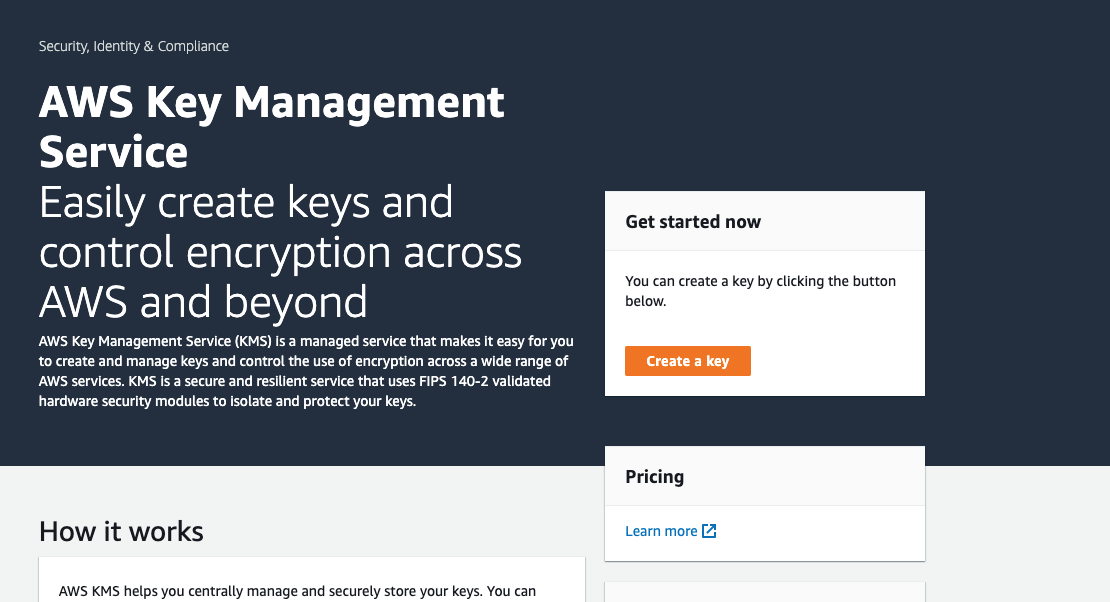
- Click on "Create a Key"
- Symmetric Key
- Key material origin: KMS
- Regionality: Single-region key
- Next
- Alias description
- Name: sops-demo-key
- Next
- Key Administrators
- None
- Next
- Key Users
- LabRole
- Next
- Finish
Get the ARN of your Key from the Console
- Click on your newly created Key
- You should see something like this:
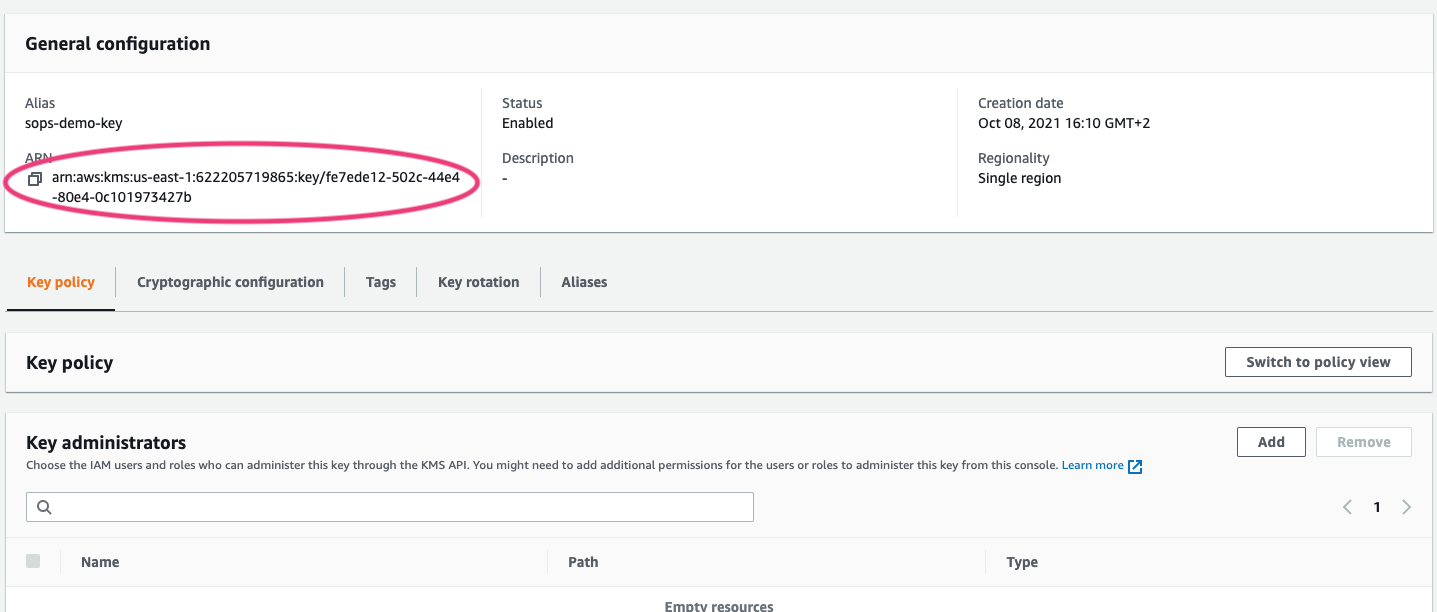
- Copy this somewhere you can easily access it, you'll need it in the next step
- If not already done, install SOPS
- Create your config file as follows
- execute following steps
  ARN="The ARN you noted down"
  sops --kms $ARN secret.env
- An editor will open, remove everything and add the following:
APP_SECRET="my-super-secret-string"
- Close the editor (:x in vi)
- Simply try to open up the file secret.env with a text editor
- You should see that the variable itself is shown in clear-text, but the secret is encrypted
- Furthermore, you should see that the arn of the AWS Key is stated in this file now, this makes it possible for you to open the file using
sops secret.envnow - Close the file again
- You can change the file at any time using
sops secret.envnow
- Now, copy the secret to your server
scp -i ~/.ssh/labsuser.pem secret.env ec2-user@${INSTANCE_HOSTNAME}:/tmp/secret.env
- SSH to the Instance
ssh -i ~/.ssh/labsuser.pem ec2-user@${INSTANCE_HOSTNAME}
Install the sample application
- Download the sample application
curl -sfL https://github.com/fhb-codelabs/secret-demo-app/releases/download/0.0.1/secret-demo-app-linux-amd64 -o /tmp/secret-demo-app
chmod a+x /tmp/secret-demo-app
- Create the directory /opt/demo-app if it doesn't exist
if [[ ! -d /opt/demo-app ]]; then
  sudo mkdir /opt/demo-app
fi
- Move the Binary
sudo mv /tmp/secret-demo-app /opt/demo-app
Set the environment and start the application
- Run the application
/opt/demo-app/secret-demo-app
- You should see the following output now
2021/10/08 16:56:49 No port is set, defaulting to 8080
2021/10/08 16:56:49 Secret to start this up is missing, the APP_SECRET environment variable might be unset
- Set the environment variables from our secret file using sops
export $(sops --decrypt /tmp/secret.env | xargs)
- Run the application again
/opt/demo-app/secret-demo-app
- The application should start now
Verify
- Open a new ssh session to the server
- Verify the output of the application (you should see your secret)
curl http://localhost:8080
- This should result in the following output:
> curl localhost:8080
Hi there, your secret is my-super-secret-string
If we create a virtual machine without the instance profile, we shouldn't be able to decrypt the secret.
- Therefore, we create a new machine:
aws ec2 run-instances --image-id ami-087c17d1fe0178315 --instance-type t2.micro --tag-specifications "ResourceType=instance,Tags=[{Key=Name,Value=sops-instance-2}]" --key-name vockey --security-groups "sops-lab-ssh-in" --output table
- Get the name of the Instance and write it to an environment variable
INSTANCE_HOSTNAME_2=$(aws ec2 describe-instances --filters "Name=tag:Name,Values=sops-instance-2" --query "Reservations[].Instances[].PublicDnsName" --out text | xargs)
- Print the hostname
echo "ssh -i ~/.ssh/labsuser.pem ec2-user@${INSTANCE_HOSTNAME_2}"
- SSH to the Instance
ssh -i ~/.ssh/labsuser.pem ec2-user@${INSTANCE_HOSTNAME_2}
- Install SOPS
curl -sfL https://github.com/mozilla/sops/releases/download/v3.7.1/sops-v3.7.1.linux -o /tmp/sops
chmod a+x /tmp/sops
sudo cp /tmp/sops /usr/local/bin/
- Copy the encrypted secret from the Developer Machine
scp -i ~/.ssh/labsuser.pem secret.env ec2-user@${INSTANCE_HOSTNAME_2}:/tmp/secret.env
- Try to open the secret (on the server)
sops --decrypt /tmp/secret.env
- You should see the following error message:
Failed to get the data key required to decrypt the SOPS file.

Group 0: FAILED
  arn:aws:kms:us-east-1:<REDACTED>: FAILED
    - | Error decrypting key: NoCredentialProviders: no valid
      | providers in chain. Deprecated.
      | 	For verbose messaging see
      | aws.Config.CredentialsChainVerboseErrors

Recovery failed because no master key was able to decrypt the file. In
order for SOPS to recover the file, at least one key has to be successful,
but none were.