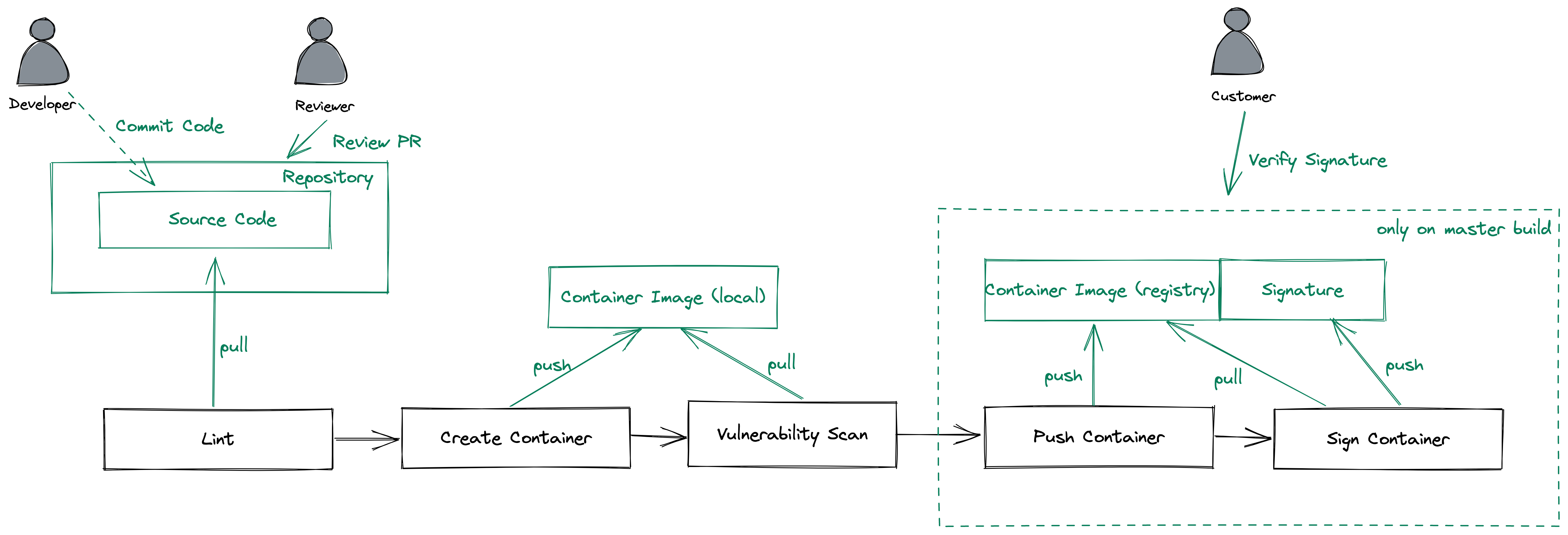
What You'll Learn
Set up an CI Pipeline using GitHub Actions
Going through an PR workflow
Doing some static code analysis
Build a container
Do vulnerability scans on your containers
Sign the containers and verify the signature
Create a fork of this repository
Navigate to https://github.com/fhb-codelabs/sample-code-repo and click "Fork"
Select the Account or Organization in which the fork should be created
Afterwards you should have got a fork of this repository in your account
(Optional) Check out your Fork
Open a shell
Change to the directory, in which the repository should be cloned
Clone the repository (replace fhb-codelabs against your username/org).
git clone https://github.com/fhb-codelabs/fhb-codelabs.github.io.git
Click on Settings -> Branches
Use "Branch Protection Rules" -> Add Rule
Branch Name Pattern: master
Check "Require a pull request before merging"
Check "Require status checks to pass before merging"
Click on "Create"
Settings -> Manage Access
Add People
Add the Name of your Peer
Add to the Repository
Afterwards your colleague should get an invitation, please accept
Now your colleague should have some more permissions on your repository
Navigate to your personal account settings https://github.com/settings/profile
Settings -> Developer Settings
Personal Access Token
Click "Generate new token"
Choose a name: podtatohead-ghcr-token
Choose Permissions:
Generate Token
Copy the Token to your clipboard
Go Back to your Repository
Settings -> Secrets -> Actions
New Repository Secret
Name: CR_PAT
Value: insert token here
Code -> Add File -> Create File
Name: .github/workflows/build.yaml
Add following content
name: builder

on:
  push:
    branches:
      - 'master'

  pull_request:
    branches:
      - 'master'

jobs:
##################################
#         Build Artefacts        #
##################################
  container_build:
    runs-on: ubuntu-20.04
    strategy:
      matrix:
        component: [ "legs", "arms", "hats", "main" ]
    steps:
    - name: Checkout Code
      uses: actions/checkout@v2

    - name: Login to GitHub Container Registry
      if: ${{ github.ref == 'refs/heads/master' || github.ref == 'refs/heads/release-*' }}
      uses: docker/login-action@v1
      with:
        registry: ghcr.io
        username: ${{ github.repository_owner }}
        password: ${{ secrets.CR_PAT }}

    - name: Lint
      uses: golangci/golangci-lint-action@v2
      with:
        version: v1.29
        working-directory: ${{ matrix.component }}

    - name: Build
      id: docker_build
      uses: docker/build-push-action@v2
      with:
        build-args: |
        context: ${{ matrix.component }}/.
        push: false
        file: ${{ matrix.component }}/docker/Dockerfile
        platforms: linux/amd64
        tags: |
           ghcr.io/${{ github.repository_owner }}/podtato-${{ matrix.component }}:${{ github.sha }}
Create a useful commit message, and commit directly to the master branch
This lints some code and creates container images. If everything is ok, we can build and push our containers
Our github actions should run now
Click on "Actions" in the Code Repository
You should see a workflow using the name of your commit message
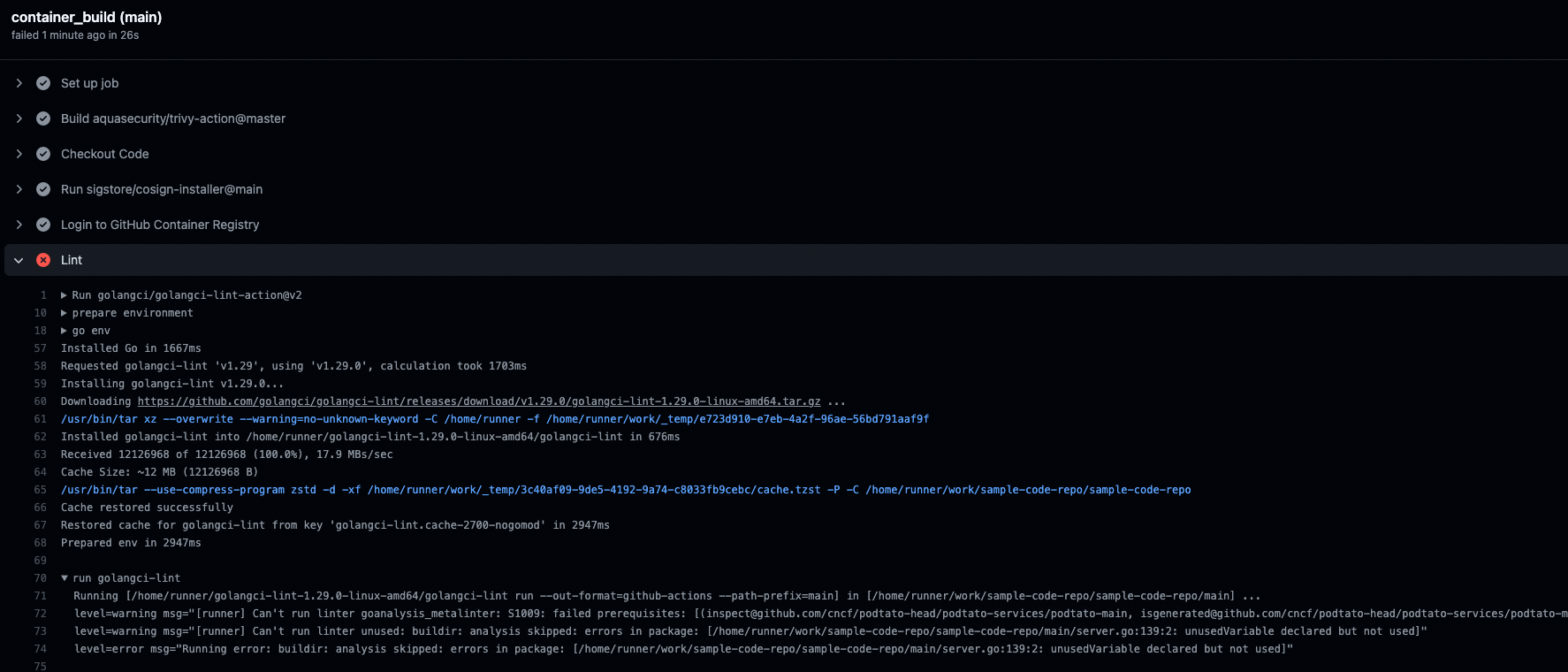
There's an issue
Let's fix this issue in the code
After the issue is fixed, commit the fix and the pipeline will re-run
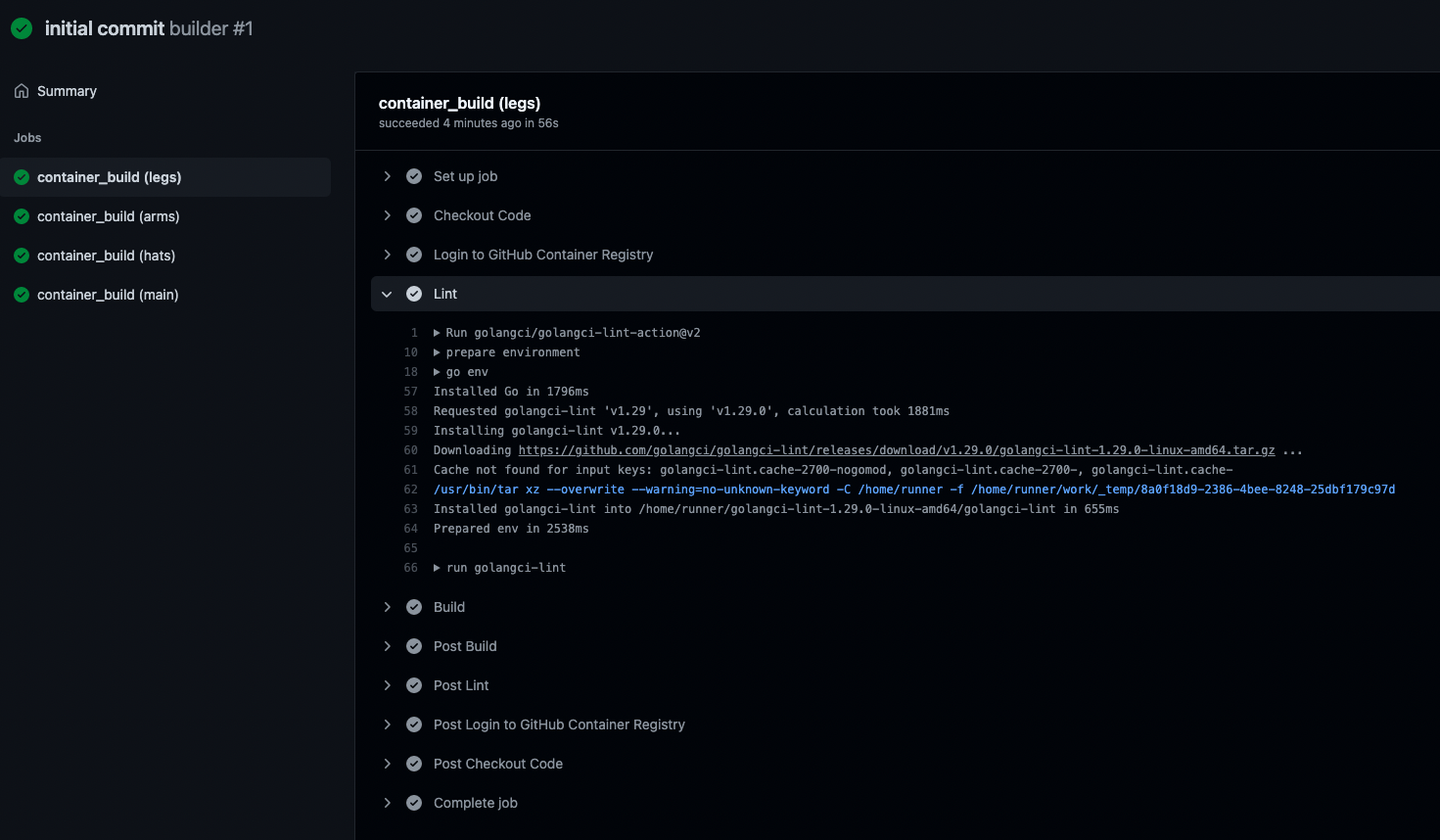
First success
When clicking on the workflow -> show all -> container_build (main) you should see a similar output (Lint step):
Switch to your peers repository username/sample-code-repo
Click on "master"
Type "feature/add_vulnerability_scan"
Create Branch "feature/add_vulnerability_scan"
Switch to that branch
Open the build.yaml of your peers repository in the branch "feature/add_vulnerability_scan"
Switch to the branch after opening the workflow file
Add the following part after the build step of your workflow:
    - name: Run Trivy vulnerability scanner
      uses: aquasecurity/trivy-action@master
      with:
        image-ref: 'ghcr.io/${{ github.repository_owner }}/podtato-${{ matrix.component }}:${{ github.sha }}'
        format: 'table'
        exit-code: '1'
        ignore-unfixed: 'true'
        vuln-type: 'os,library'
        severity: 'CRITICAL,HIGH'
Click on "Start commit"
Create a useful commit message
Commit to the feature/add_vulnerability_scan branch
If you click on "Actions" now, nothing should happen
Click on "Pull requests" in your peers repository
You should see something similar to this:
Select "Compare & Pull request"
Select master as base for that pull request
Select your peers repo as the base repository (not the upstream fhb-codelabs/sample-code-repo)
Type "Implement Vulnerability Scanning" as the name of the PR
Click on "Create pull request"
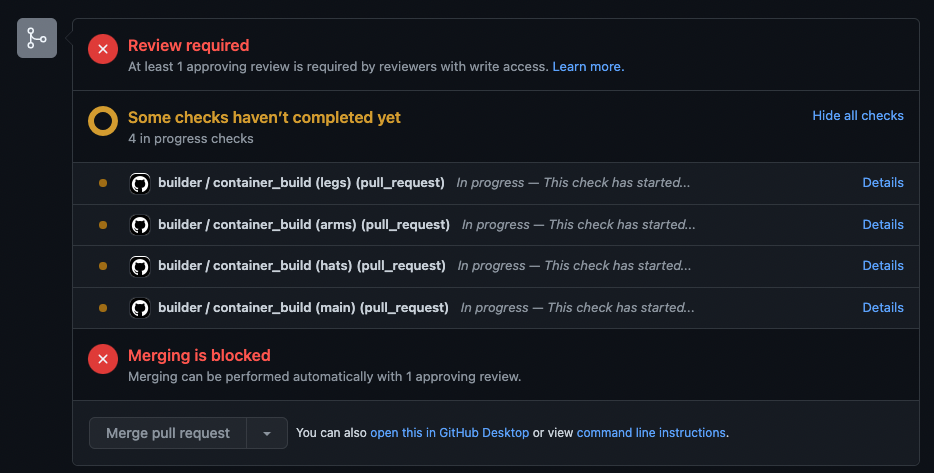
You should now see following things in the PR overview
As we instructed our workflow to automatically build on pr and defined that all actions have to pass before merging, merging is blocked now
Another Issue
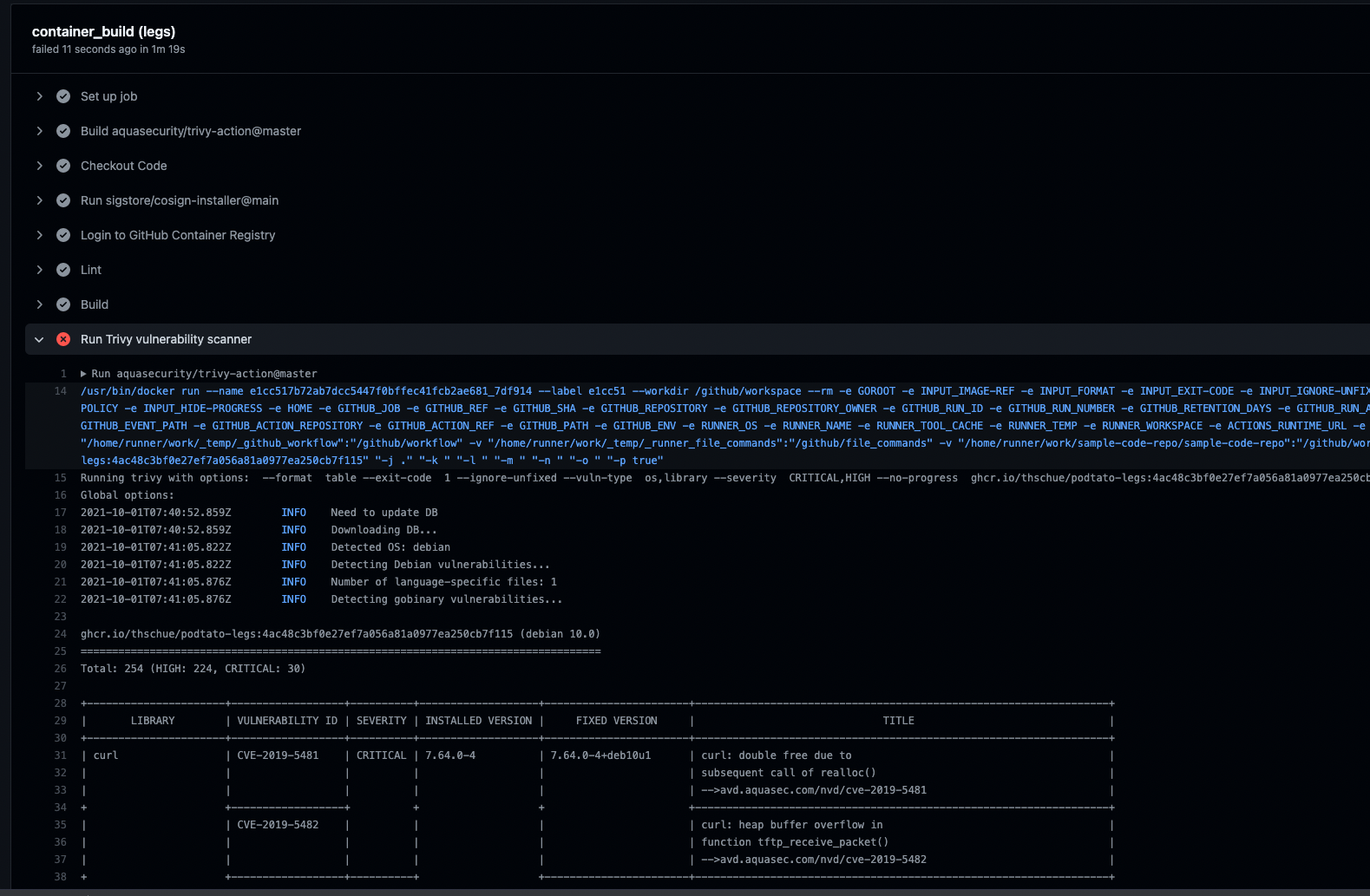
In the actions screen, our workflow should show up and we should see an error while running the workflow
It seems like we are using something insecure, let's fix this error (take a look on outdated things) and push this to the repository
Successful Build
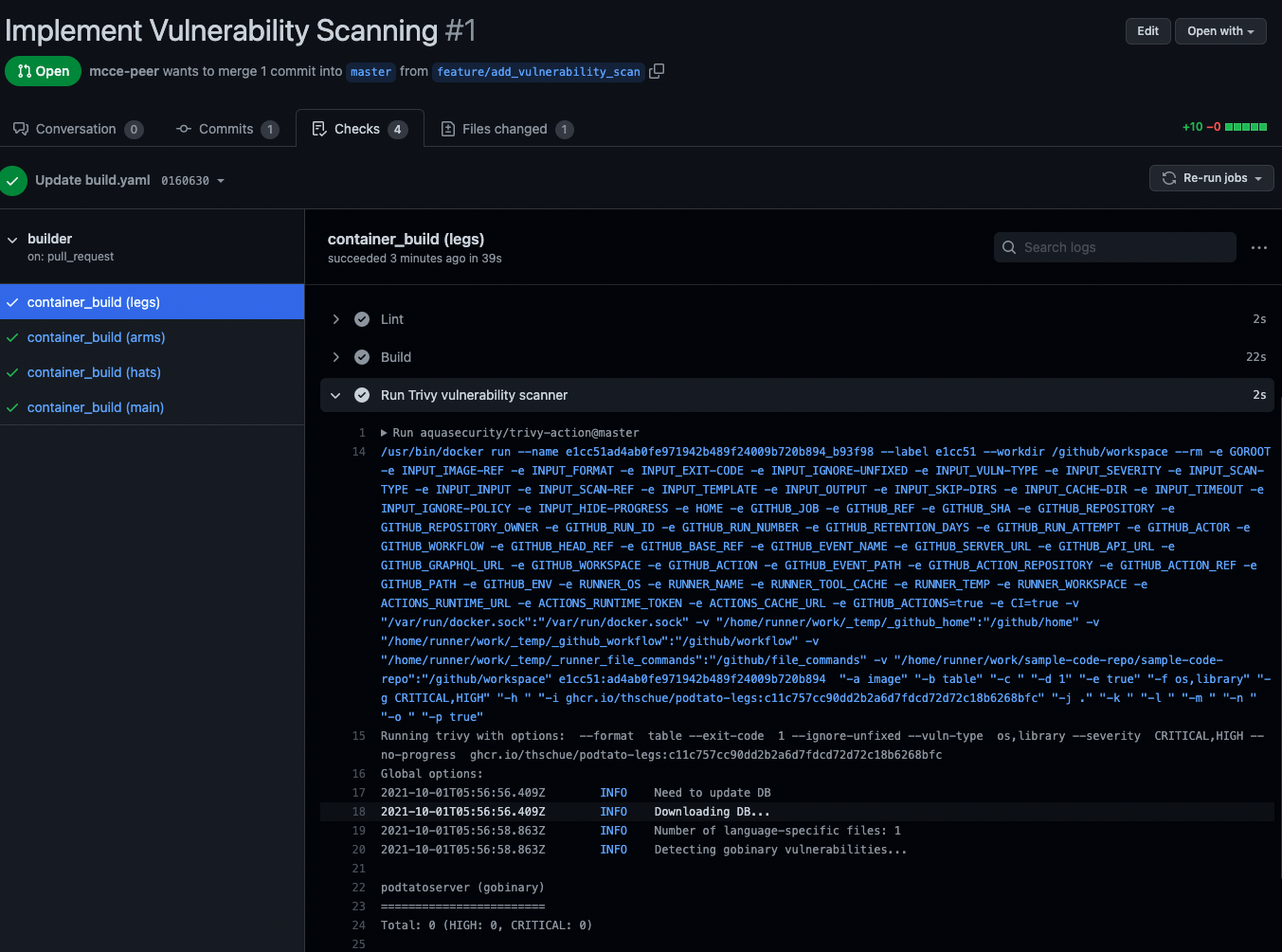
After a few minutes, we see that "All checks have passed"
When taking a look to the triggered pipeline the result for the trivy step should look like this:
- Note, that you didn't push to master until now, we're just checking if the container has vulnerabilities
Now it's time for your peer to approve your pull request (and for you to approve the other one)
Open your git repository
Click on pull requests
Take a look on the pull request of your peer
Check if all checks were running
"Add your review"
Validate the code carefully
Review changes
"LGTM"
Approve
Submit Review
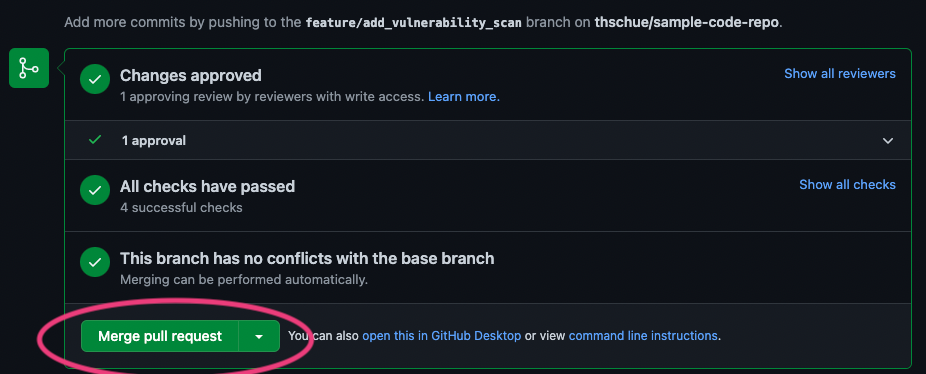
After that, the PR is in the following state:
Merge pull request
You can delete the branch now
Start a VM in AWS
Create a security group for SSH
aws ec2 create-security-group --group-name ssh-in --description "SSH Traffic to Instances"
aws ec2 authorize-security-group-ingress \
    --group-name ssh-in \
    --protocol tcp \
    --cidr 0.0.0.0/0 \
    --port 22
Create an Instance
aws ec2 run-instances --image-id ami-087c17d1fe0178315 --instance-type t2.micro --tag-specifications "ResourceType=instance,Tags=[{Key=Name,Value=temporary-instance}]" --key-name vockey --security-groups "ssh-in" --output table
Connect to this instance via SSH
INSTANCE_HOSTNAME=$(aws ec2 describe-instances --filters "Name=tag:Name,Values=temporary-instance" --query "Reservations[].Instances[].PublicDnsName" --out text | xargs)
echo "ssh -i ~/.ssh/labsuser.pem ec2-user@${INSTANCE_HOSTNAME}"
ssh -i ~/.ssh/labsuser.pem ec2-user@${INSTANCE_HOSTNAME}
Download cosign
wget https://github.com/sigstore/cosign/releases/download/v1.2.1/cosign-linux-amd64
chmod a+x cosign-linux-amd64
Generate your key pair
./cosign-linux-amd64 generate-key-pair

Enter password for private key:
Enter password for private key again:
Generate a password and enter it there
Afterwards you should store the public key in the GitHub Repo for verification purposes
Take the output of cat cosign.pub and store it in your git repository in .github/workflows/cosign.pub. You can do the same thing for the private key cosign.key (use a strong passphrase) to be able to sign in your github actions
Add the passphrase to GitHub
In GitHub
Settings -> Secrets -> Actions
New Repository Secret
Name: COSIGN_PASSWORD
Value: insert passphrase here
Firstly, add the cosign installer after the "Checkout Code" Block of your pipeline
    - uses: sigstore/cosign-installer@main
      with:
        cosign-release: 'v1.0.0'
Add a build and push step to the pipeline
    - name: Build
      id: docker_build_push
      uses: docker/build-push-action@v2
      with:
        build-args: |
        context: ${{ matrix.component }}/.
        push: ${{ github.ref == 'refs/heads/master' }}
        file: ${{ matrix.component }}/docker/Dockerfile
        platforms: linux/amd64
        tags: |
          ghcr.io/${{ github.repository_owner }}/podtato-${{ matrix.component }}:${{ github.sha }}
After that, add the signing step to the end of your pipeline
    - name: Sign Container
      if: ${{ github.ref == 'refs/heads/master' || github.ref == 'refs/heads/release-*' }}
      env:
        COSIGN_PASSWORD: ${{ secrets.COSIGN_PASSWORD }}
      run: cosign sign -key .github/workflows/cosign.key -a GIT_HASH=${{ env.GIT_SHA }} ghcr.io/${{ github.repository_owner }}/podtato-${{ matrix.component }}:${{ github.sha }}
After the next pipeline run, the images should get signed and the pipeline should be "green"
Go back to your AWS Instance
Run the following command
./cosign-linux-amd64 verify -key cosign.pub ghcr.io/<repo>/podtato-main:<your hash>

Verification for ghcr.io/thschue/podtato-main:bdce48dc9c64a1b42fa1ce15474a82a832471773 --
The following checks were performed on each of these signatures:
  - The cosign claims were validated
  - The signatures were verified against the specified public key
  - Any certificates were verified against the Fulcio roots.

[{"critical":{"identity":{"docker-reference":"ghcr.io/<repo>/podtato-main"},"image":{"docker-manifest-digest":"sha256:eb7e3da2cdbcea455fdbfb189e14bb1bde0574de745d9517b5e8feff77302c75"},"type":"cosign container image signature"},"optional":{"GIT_HASH":""}}]